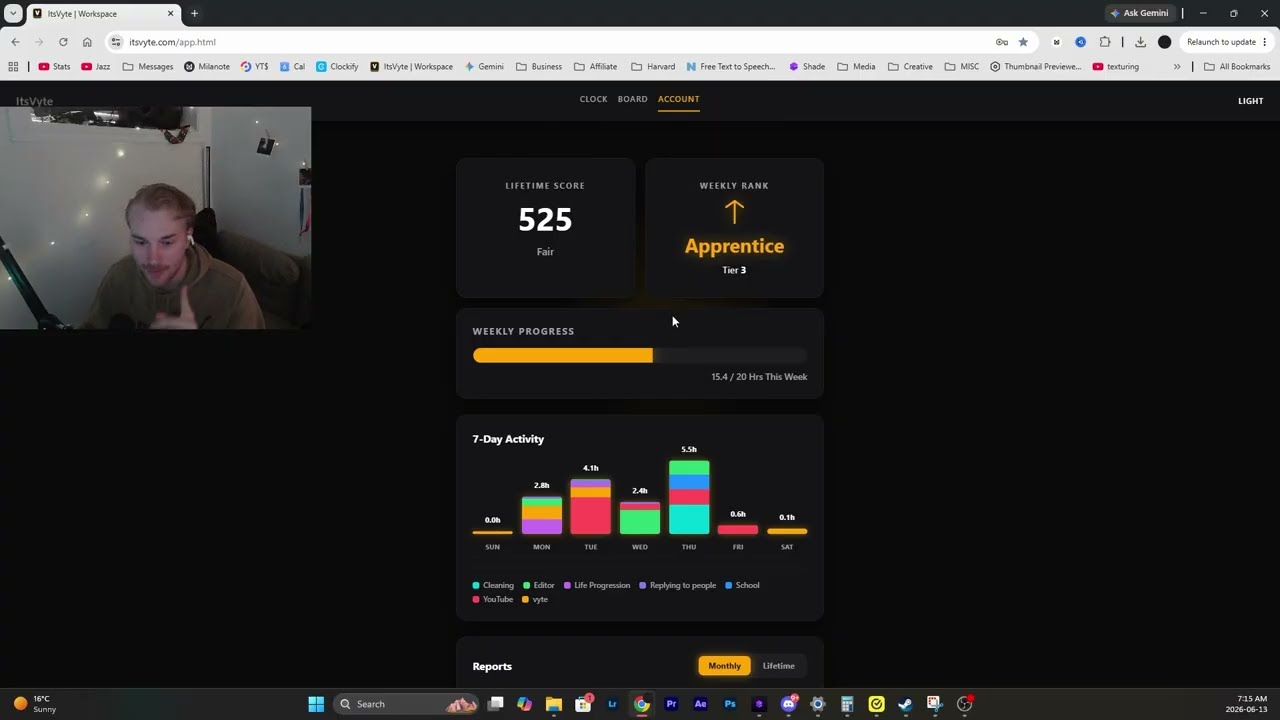
The unified workspace made for video editors and content creators — by someone who does the work too. Protect your billable hours with a focused task clock, then lay out cuts, scripts, and ideas on an infinite visual board.
Watch · Product tour
See ItsVyte in action.
A quick walkthrough of the workspace — the focused task clock, the infinite board, and how cuts, scripts, and ideas come together in one place. Press play for the tour, then try the live demo below.
Walkthrough · ItsVyte workspace tour
Live Demo · No signup
This is the board.
A quick taste of the visual canvas — drag a tool from the rail onto the grid, move things around, and pan the infinite board. This is a stripped-back preview, not the real thing: the full paid workspace is far more powerful, and features like bubbles and documents are disabled here.
Main Board
DEMO
0 / 8 assetsZoom 100%
Drag a tool from the rail → drop it on the canvas. Drag the empty grid to pan.
!You're on the demo board
This is just a preview and is far less advanced than the full paid board. Bubbles and documents don't work here — they're only available in the paid workspace.
You've hit the 8-asset demo cap. The full board is unlimited, auto-saves, and syncs across devices.
Time Tracking
Watch your week add up.
Every clock-in is logged against a project. The workspace rolls it into a weekly breakdown so you always know exactly where your billable hours went — and can prove it to a client.
This Week · Tracked
0hrs
across 3 active projects · sample data
Client Edit
YouTube
Personal
Why ItsVyte
Built for visual minds, not checklists.
Standard task managers are too linear for editors scrubbing multi-cam timelines and creators structuring narrative cut-downs. ItsVyte gives you an infinite drag-and-drop canvas paired with a strict task clock — so you can map non-linear pacing and account for billable editing hours in one place.
Plans
Pick what fits your workflow.
Tracker
$5/mo
Task clock in/out
Weekly output metrics
Persistent timeline logs
FULL WORKSPACE
Complete
$10/mo
Everything in Tracker
Infinite organization board
Script & asset mapping
Workspace Access
Sign in to your workspace, or register a new account.
Set a new password
Enter a new password for your account below.
Terms of Service
Last updated: 27 May 2026. These Terms form a binding agreement between you and the operator of ItsVyte (“ItsVyte”, “we”, “us”, or “our”). By creating an account, subscribing, or otherwise using the service, you confirm that you have read, understood, and agree to be bound by these Terms. If you do not agree, do not use the service.
1. Who We Are & Eligibility
ItsVyte is an independently operated software-as-a-service workspace built and run from Canada. References to “we” include the individual owner-operator of ItsVyte. You must be at least the age of majority in your province or territory of residence (or have the consent of a parent or guardian) and able to form a binding contract to use the service. You are responsible for the accuracy of the account information you provide and for keeping your login credentials confidential.
2. The Service, Subscriptions & Billing
ItsVyte is offered on a paid subscription basis. Plans, features, and pricing are described at sign-up and may change on a going-forward basis. Payments are processed by our third-party payment provider (Stripe); we do not store your full card details. By subscribing you authorize recurring charges until you cancel. Unless a non-refundable term is stated at purchase or required by applicable law, fees already paid are generally non-refundable, and cancelling stops future renewals rather than refunding the current period. You are responsible for any taxes associated with your use. Where consumer-protection legislation in your jurisdiction grants you rights regarding auto-renewals, cancellation, or refunds, nothing in these Terms removes those statutory rights.
3. Your Content & Our Intellectual Property
You retain ownership of everything you create in your workspace — notes, boards, documents, images, links, and time logs (“Your Content”). We do not claim ownership of Your Content. You grant us a limited, non-exclusive licence to host, store, transmit, back up, and display Your Content solely as needed to operate and provide the service to you. You are solely responsible for Your Content and confirm you have the rights to use, upload, and store it. The ItsVyte software, source code, design, interface, branding, name, and logo remain our exclusive property and are protected by Canadian and international intellectual-property laws. You may not copy, reverse-engineer, decompile, resell, sublicense, frame, scrape, or create derivative works from the service except as permitted by law.
4. Acceptable Use
You agree not to use the service to break any law; infringe anyone’s intellectual-property or privacy rights; upload malware or unlawful, harmful, or infringing material; attempt to gain unauthorized access to the service, other accounts, or our infrastructure; run automated scripts, bots, or scrapers against the platform; bypass usage limits or authentication; or interfere with the service’s normal operation. Reasonable per-account storage and usage limits apply to keep the service fast and stable for everyone. We may suspend or terminate accounts that violate this section, with or without notice.
5. Service Availability, Backups & “As Is”
The service is provided on an “as is” and “as available” basis. We aim for high reliability but do not warrant that the service will be uninterrupted, error-free, secure, or free from data loss, and we are not responsible for outages, failures, or data loss caused by third-party providers (including hosting, database, and payment processors), your own devices or connectivity, or events beyond our reasonable control. You are responsible for keeping your own independent backups of anything important.
6. Disclaimer of Warranties
To the maximum extent permitted by applicable law, we disclaim all warranties, conditions, and representations of any kind, whether express, implied, statutory, or otherwise, including any implied warranties of merchantability, fitness for a particular purpose, durability, title, and non-infringement. No advice or information obtained from us or the service creates any warranty not expressly stated here. Some jurisdictions do not allow the exclusion of certain warranties; in those cases, the excluded warranties are limited to the minimum scope and shortest duration permitted by law.
7. Limitation of Liability
To the maximum extent permitted by applicable law, and except where prohibited: (a) in no event will ItsVyte, its owner-operator, or anyone acting on our behalf be liable for any indirect, incidental, special, consequential, exemplary, or punitive damages, or for any loss of profits, revenue, data, goodwill, business, or anticipated savings, however caused and on any theory of liability, even if advised of the possibility of such damages; and (b) our total aggregate liability arising out of or relating to the service or these Terms will not exceed the greater of the total fees you actually paid to us in the twelve (12) months immediately before the event giving rise to the claim, or CAD $100. These limits apply in the aggregate across all claims and protect both ItsVyte and its owner-operator personally. If your jurisdiction does not allow some of these limitations, they apply only to the extent permitted by law.
8. Indemnification
You agree to indemnify, defend, and hold harmless ItsVyte and its owner-operator, contractors, and service providers from and against any claims, demands, losses, liabilities, damages, costs, and expenses (including reasonable legal fees) arising out of or related to Your Content, your use or misuse of the service, your violation of these Terms, or your violation of any law or the rights of any third party.
9. Privacy & Data Protection
We collect and process limited personal information (such as your email address, account identifiers, and basic usage/technical logs) only as needed to provide and secure the service. We handle personal information in accordance with applicable Canadian privacy law, including the Personal Information Protection and Electronic Documents Act (PIPEDA) and, where it applies, provincial legislation such as Quebec’s Law 25. We do not sell your personal information. Data may be stored or processed by trusted third-party infrastructure providers, which may be located outside your province or country. By using the service you consent to this collection, use, and cross-border processing for the purposes described here.
10. Third-Party Services
The service relies on third-party providers (for example, hosting, database, authentication, link previews, and payment processing). We are not responsible for the acts, omissions, availability, or content of those third parties, and your use of them may also be subject to their own terms and privacy policies.
11. Suspension & Termination
You may stop using the service and cancel your subscription at any time. We may suspend or terminate your access if you breach these Terms, fail to pay, or use the service in a way that risks harm to the service, other users, or us. On termination, your right to use the service ends; we may delete workspace data after a reasonable period, so keep your own backups. Sections that by their nature should survive termination — including intellectual property, disclaimers, limitation of liability, indemnification, and governing law — will continue to apply.
12. Changes to the Service or Terms
We may modify, add, or discontinue features, and may update these Terms from time to time. Material changes will be reflected by updating the “last updated” date above and, where reasonable, by notice within the service. Your continued use after changes take effect constitutes acceptance of the updated Terms.
13. Governing Law & Disputes
These Terms are governed by the laws of Canada and the province in which the ItsVyte owner-operator resides, without regard to conflict-of-laws rules. You agree that the courts located in that province will have exclusive jurisdiction over any dispute, subject to any non-waivable rights you have under the consumer-protection laws of your own jurisdiction. To the extent permitted by law, any dispute will be resolved on an individual basis and not as part of a class or representative proceeding.
14. General
If any provision of these Terms is found unenforceable, the remaining provisions stay in full force, and the unenforceable provision will be limited or replaced to the minimum extent needed. Our failure to enforce a provision is not a waiver of it. These Terms are the entire agreement between you and us regarding the service. Questions? Contact us at Vyteapp@gmail.com.
These Terms are provided for general protection and information and are not legal advice. Laws differ by province and change over time; for terms tailored to your exact situation, you should have them reviewed by a licensed Canadian lawyer.